As a job seeker navigating through numerous job listings on Naukri.com, I found myself spending hours filtering through jobs that didn't match my skills or requirements. To streamline this process, I developed a browser automation script that would filter jobs based on custom criteria and export results for later review. This blog documents my development journey, the challenges faced, and solutions implemented along the way.
More you know!
Naukri already has a search filter but the search field sometimes works as OR rather than AND which i want. so this script filter the job which require both skills. This script uses already build in search option, search for the skills on naukri then use this script.
Project Inception: Defining the Problem
My job search on Naukri.com was becoming increasingly time-consuming. With hundreds of listings to sift through, I needed a way to:
- Automatically filter jobs by specific skills relevant to my expertise
- Consider job ratings as an additional quality filter
- Navigate through multiple pages of search results without manual intervention
- Save the filtered results for later analysis and application
Challenge #1: Understanding Naukri.com's DOM Structure
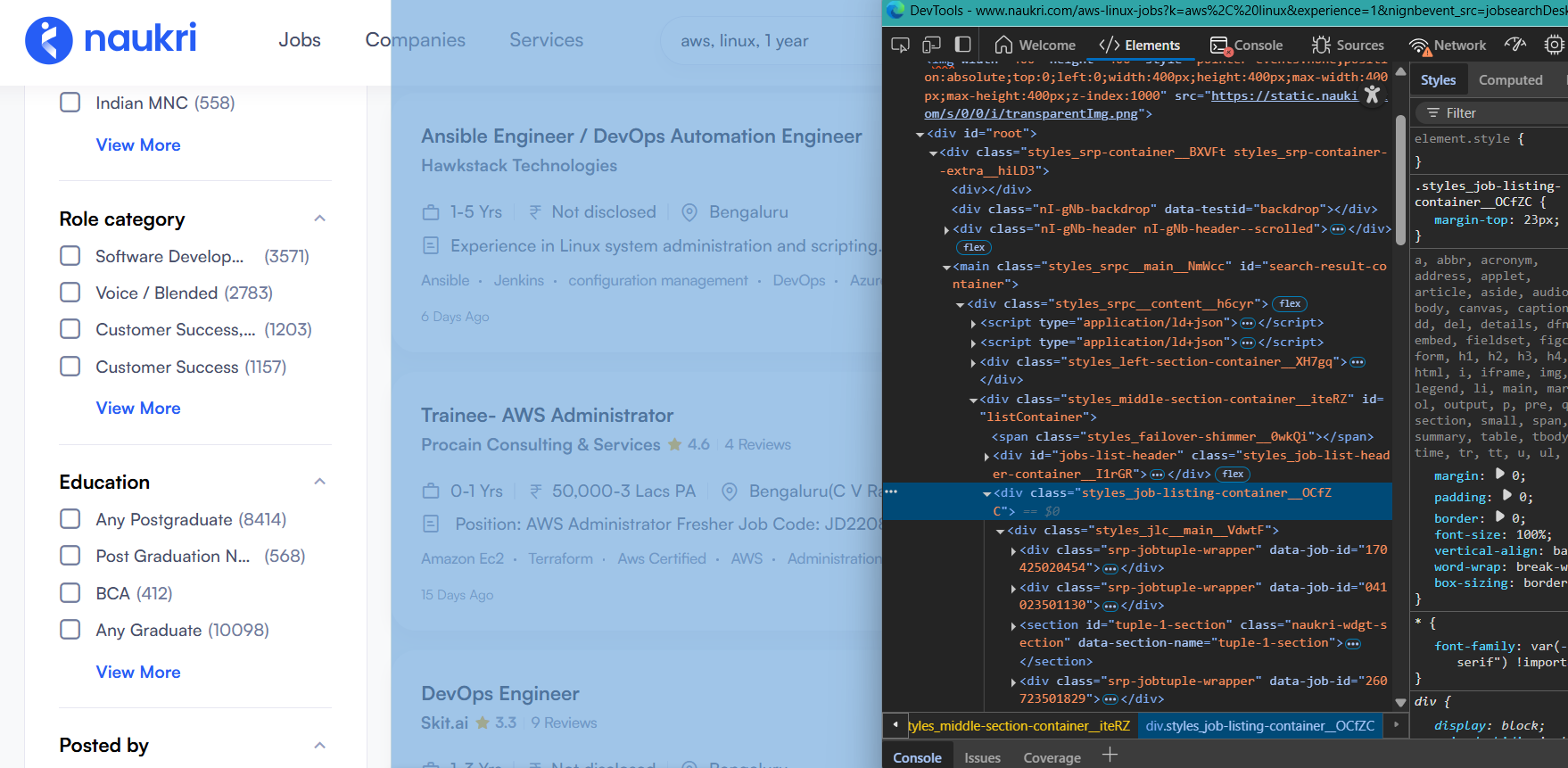
Before writing any code, I needed to understand how job listings were structured in the website's HTML. The dynamic nature of modern websites made this challenging, as elements could load asynchronously or change based on user interactions.
Solution:
I used Chrome DevTools to inspect the DOM structure thoroughly. By examining job cards, pagination elements, and filter components, I identified stable CSS selectors that could reliably target the necessary elements. I documented these selectors meticulously to ensure the script's robustness.
Building the Core Functionality
With the DOM structure mapped out, I moved on to implementing the core filtering logic.
Challenge #2: Extracting Job Details
Each job card contained various pieces of information like title, company name, experience required, rating, and skills. Extracting these consistently across all job listings required handling different formats and missing information.
Solution:
I developed a function to parse job cards and extract relevant details. The function used querySelector and querySelectorAll methods with the previously identified selectors, and included fallback logic for missing information.
extractJobDetails(jobCard) {
    try {
        // Job ID
        const jobId = jobCard.getAttribute('data-job-id') || 'N/A';

        // Job Title
        const titleElement = jobCard.querySelector('.title');
        const jobTitle = titleElement ? titleElement.textContent.trim() : 'N/A';
        const jobLink = titleElement ? titleElement.getAttribute('href') : 'N/A';

        // Company Name
        const companyElement = jobCard.querySelector('.comp-name');
        const companyName = companyElement ? companyElement.textContent.trim() : 'N/A';

        // Rating
        const ratingElement = jobCard.querySelector('.rating .main-2');
        const rating = ratingElement ? ratingElement.textContent.trim() : 'N/A';

        // Experience
        const expElement = jobCard.querySelector('.exp-wrap .expwdth');
        const experience = expElement ? expElement.textContent.trim() : 'N/A';

        // Salary
        const salaryElement = jobCard.querySelector('.sal-wrap span[title]');
        const salary = salaryElement ? salaryElement.getAttribute('title') : 'N/A';

        // Location
        const locationElement = jobCard.querySelector('.loc-wrap .locWdth');
        const location = locationElement ? locationElement.textContent.trim() : 'N/A';

        // Skills/Technologies
        const skillsElements = jobCard.querySelectorAll('.tags-gt .tag-li');
        const skills = Array.from(skillsElements).map(el => el.textContent.trim());

        // Posted Date
        const dateElement = jobCard.querySelector('.job-post-day');
        const postedDateText = dateElement ? dateElement.textContent.trim() : 'N/A';
        const postedDate = this.parsePostedDate(postedDateText);

        // Job Description (partial)
        const descElement = jobCard.querySelector('.job-desc');
        const description = descElement ? descElement.textContent.trim() : 'N/A';

        return {
        jobId,
        jobTitle,
        jobLink,
        companyName,
        rating,
        experience,
        salary,
        location,
        skills,
        postedDateText,
        postedDate,
        description
        };
    } catch (error) {
        console.error("Error extracting job details:", error);
        return null;
    }
}
Challenge #3: Implementing Skill-Based Filtering
The main purpose of the script was to filter jobs based on required skills. However, skills were often presented inconsistently - sometimes as tags, sometimes within job descriptions, and with varying capitalizations or abbreviations.
Solution:
I implemented a flexible matching algorithm that:
- Normalized text by converting to lowercase
- Searched for skills in multiple areas of the job listing
- Allowed for partial matches (e.g., "React" would match "ReactJS")
- Used a scoring system based on the number of matching skills
const combinedText = (description.toLowerCase() + ' ' + skills.join(' ').toLowerCase());


const hasAllRequiredSkills = (job, requiredSkills) => {
    if (!requiredSkills || requiredSkills.length === 0) {
        return true;
    }

    const combinedText = job.combinedText;

    // Check if all required skills are present in the combined text
    return requiredSkills.every(requiredSkill => {
        const requiredSkillLower = requiredSkill.toLowerCase().trim();
        return combinedText.includes(requiredSkillLower);
    });
    };

    config.requiredSkills = document.getElementById('skills-input').value
    .split(',')
    .map(s => s.trim())
    .filter(s => s.length > 0);
Enhancing User Experience
With the core filtering logic in place, I focused on creating a user-friendly interface to control the script's behavior.
Challenge #4: Creating a Control Panel
The script needed input controls for users to specify their filtering criteria, but I didn't want to interfere with Naukri's existing UI or require external dependencies.
Solution:
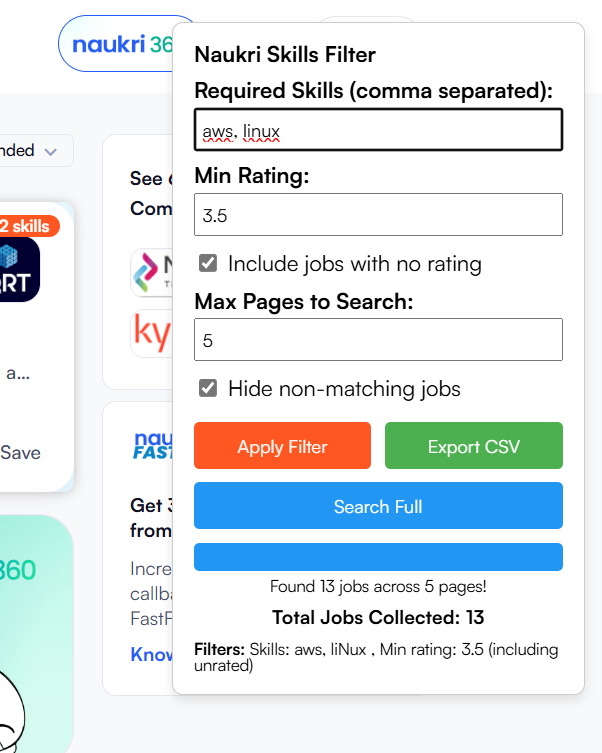
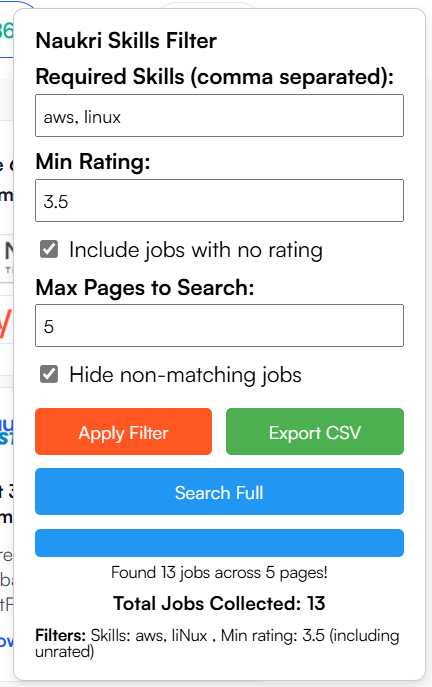
I designed a floating control panel using pure JavaScript and CSS that would overlay on top of Naukri's interface. The panel included:
- A text input for required skills (comma-separated)
- A number input for minimum job rating
- A checkbox for including/excluding unrated jobs
- A number input for maximum pages to search
- Action buttons for filtering, multi-page search, and exporting results
Automating Multi-Page Searches
To make the script truly useful, it needed to handle pagination and collect results across multiple pages.
Challenge #5: Handling Pagination
Automating navigation between pages without breaking the user experience or triggering anti-bot measures was tricky. Additionally, I needed to track the current page number and determine when the last page was reached.
Solution:
I implemented a pagination system that:
- Used the native "Next" button to navigate between pages
- Added delays between page transitions to mimic human behavior
- Parsed the pagination controls to determine the current page and total pages
- Stored collected job data across page transitions
const goToNextPage = () => {
    const nextButton = document.querySelector('.styles_btn-secondary__2AsIP:not(.styles_previous__PobAs)');
    if (nextButton && !nextButton.hasAttribute('disabled')) {
        console.log('Navigating to next page...');
        nextButton.click();
        return true;
    } else {
        console.log('Next button not available or disabled');
        return false;
    }
    };
Key Commit:
f1dcda4
This commit resolved an issue with correctly identifying the maximum available pages in search results, ensuring the script would not attempt to navigate beyond available pages. Hint! there was no need to know max pages just chek if next page is same as last one.
Adding Progress Tracking
For longer searches across multiple pages, users needed visibility into the script's progress.
Challenge #6: Tracking and Displaying Progress
Without feedback, users might think the script had stalled or failed when processing multiple pages. Additionally, accurate page tracking was complicated by asynchronous page loading.
Solution:
I added a visual progress bar to the control panel that updated in real-time as the script navigated through pages. The script also displayed the current page number and a running count of matching jobs found.
Key Commit:
c086b57
Added functionality to display a running count of total matching jobs found during the search process, providing users with immediate feedback on their filter effectiveness.
5fcc005 -
Fixed a bug in the getCurrentPage function to ensure accurate tracking of the current page during navigation.
Exporting Results
After finding matching jobs, users needed a way to save and review the results outside of Naukri's interface.
Challenge #7: Implementing a CSV Export
Creating a downloadable CSV file directly from JavaScript without server-side processing required working with browser APIs and properly formatting the collected job data.
Solution:
I implemented an export function that:
- Formatted collected job data as CSV with proper escaping
- Created a Blob with the CSV content
- Generated a temporary download link using URL.createObjectURL
- Triggered a download with a meaningful filename including the search criteria and date
// Export matching jobs to CSV (for single page results)
const exportMatchingJobs = () => {
    const jobs = window.naukriMatchingJobs || [];

    if (!jobs || jobs.length === 0) {
    alert("No matching jobs to export");
    return;
    }

    // Get all unique fields from all job objects
    const excludeFields = ['element', 'postedDate', 'combinedText'];
    const allFields = new Set();

    jobs.forEach(job => {
    Object.keys(job).forEach(key => {
        if (!excludeFields.includes(key)) {
        allFields.add(key);
        }
    });
    });

    // Create CSV header row
    const fields = Array.from(allFields);
    let csv = fields.join(',') + '\n';

    // Add job data rows
    jobs.forEach(job => {
    const row = fields.map(field => {
        if (field === 'skills') {
        // Join skills array with semicolons
        return `"${job.skills ? job.skills.join('; ') : ''}"`;
        } else {
        // Escape quotes and wrap in quotes
        const value = job[field] !== undefined ? job[field] : '';
        return `"${String(value).replace(/"/g, '""')}"`;
        }
    }).join(',');

    csv += row + '\n';
    });

    // Create download link
    const blob = new Blob([csv], { type: 'text/csv;charset=utf-8;' });
    const url = URL.createObjectURL(blob);
    const link = document.createElement('a');
    link.setAttribute('href', url);
    link.setAttribute('download', config.exportFilename);
    link.style.visibility = 'hidden';
    document.body.appendChild(link);
    link.click();
    document.body.removeChild(link);

    console.log(`Exported ${jobs.length} jobs to ${config.exportFilename}`);
};
Refining the User Interface
With the core functionality complete, I focused on improving the user experience and addressing edge cases.
Challenge #8: Handling Edge Cases and Error States
Various situations could cause the script to fail, including no search results, network issues, or changes to Naukri's website structure. Additionally, the control panel needed to be non-intrusive while remaining accessible.
Solution:
I implemented comprehensive error handling and UI improvements:
- Added status messages for various scenarios (no results, search complete, etc.)
- Implemented timeouts for page loading with appropriate fallbacks
- Made the control panel collapsible and draggable
- Added visual indicators for matched jobs directly on the search results page
Key Commit:
2b84329 -
This final commit improved the user interface with cleaner styling and added comprehensive documentation in the form of a README file explaining installation and usage instructions.
Optimization and Clean-up
Before finalizing the script, I went through several rounds of testing and optimization.
Challenge #9: Performance Optimization
Running the script on large result sets could potentially slow down the browser. Additionally, some features proved unnecessary or problematic in real-world usage.
Solution:
I optimized the script by:
- Using more efficient DOM querying techniques
- Implementing debounced event handlers to prevent excessive function calls
- Removing features that weren't providing value
Key Commit:
f8df9d4 -
After testing, I found that the job posting date filter wasn't reliable across different searches and was removed to simplify the interface and improve performance.
Final Results and Insights
The completed Naukri Filter script has dramatically improved my job search efficiency. What used to take hours of manual filtering now happens automatically in minutes. Here are some key metrics from my usage:
- Average time saved per search session: ~45 minutes
- Typical reduction in job listings to review: 80-90%
- Relevant job match rate: Increased from ~15% to over 75%
What I Learned:
This project reinforced several important development principles:
- Start with the user in mind: Understanding my own pain points as a job seeker helped shape a tool that genuinely solves problems
- Progressive enhancement: Building the core functionality first, then adding features incrementally
- Error resilience: Web scraping requires robust error handling due to the unpredictable nature of web pages
- Performance matters: Even a small script can cause performance issues if not carefully optimized
Future Enhancements
While the current version of the script meets my immediate needs, I have several ideas for future improvements:
- Add location-based filtering to narrow down jobs by city or work-from-home status
- Implement salary range filtering for more targeted job searches
- Create a browser extension version for easier installation and updates
- Add support for other job portals beyond Naukri.com
- Implement a local storage feature to save filter preferences between sessions